WorkflowVault

Ops · n8n template

AI Receipt & Invoice Logger: n8n workflow that turns emailed bills into a spreadsheet

Stop copying numbers from receipts at month end. This workflow spots receipts and invoices in your inbox, reads the email and PDF text with AI and keeps a clean expense log in Google Sheets for you or your bookkeeper.
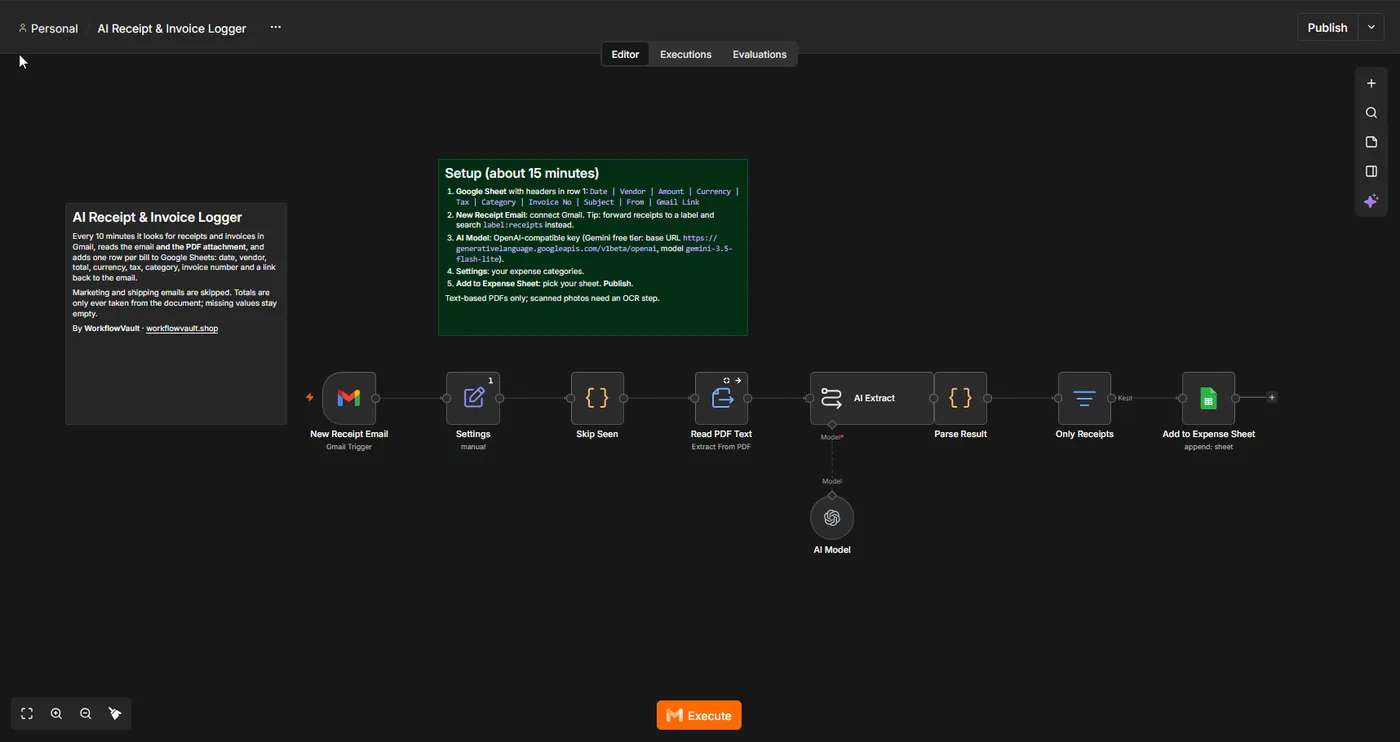
How the workflow runs

  1. Gmail triggerWatches for emails that look like receipts or invoices (your filter).
  2. ReadTakes the email text and the PDF attachment text.
  3. AI extractReturns vendor, date, amount, currency, tax and a category.
  4. Google SheetsAdds one row per document with a link back to the email.

What you get

  • An expense sheet that fills itself
  • Vendor, date, amount, tax and category per receipt
  • Link to the original email on every row
  • Your own category list

What you need

  • n8n (Cloud or self-hosted)
  • Gmail
  • Google Sheets
  • Any OpenAI-compatible AI key (Gemini free tier works)

See the workflow

Gmail trigger, PDF text, AI extraction, then one sheet row per receipt.

Read the full setup guide

Set up in about 15 min

  1. Get the fileDownload the .json workflow and setup guide.
  2. ImportIn n8n, open a new workflow and choose Import from File.
  3. ConnectAdd your own accounts where the sticky notes point.
  4. ActivateRun once to test, then publish. It keeps running on its own.

Questions

Does it read scanned images?

It reads email text and text-based PDFs. Photo-only scans need an OCR step, which we can add.

Is it accounting software?

No. It is a tidy log you can import into your accounting tool or send to your bookkeeper.

More from the vault

FM
Ops

Form to Sheet + Alert

Saves every form submission to Google Sheets and alerts you by email or WhatsApp the moment it arrives.

Form→Clean up→Sheets→Email
BK
Ops

Backup + Error Alerts

Backs up all your workflows to a private GitHub repo every night and emails you when any workflow fails.

Nightly→n8n API→GitHub→Email
UP
Ops

Website Uptime Monitor

Checks your websites every 5 minutes and emails you the moment one goes down, and again when it is back.

Schedule→Check URLs→Compare→Email