WorkflowVault

Ops · n8n template

Form to Google Sheets + instant alert: free n8n workflow

Never miss a form submission again. This free workflow saves every entry to a Google Sheet and pings you by email or WhatsApp the moment it arrives.
How the workflow runs

  1. Form or webhookReceives submissions from an n8n form or your website.
  2. Google SheetsAppends a row with every field and a timestamp.
  3. AlertSends you an email or WhatsApp message with the details.

What you get

  • Every submission saved in one sheet
  • Instant alert with the details
  • Works with n8n Forms or any website form

What you need

  • n8n (Cloud or self-hosted)
  • Google Sheets
  • Gmail or any SMTP email
  • Optional: a WhatsApp alert service

See the workflow

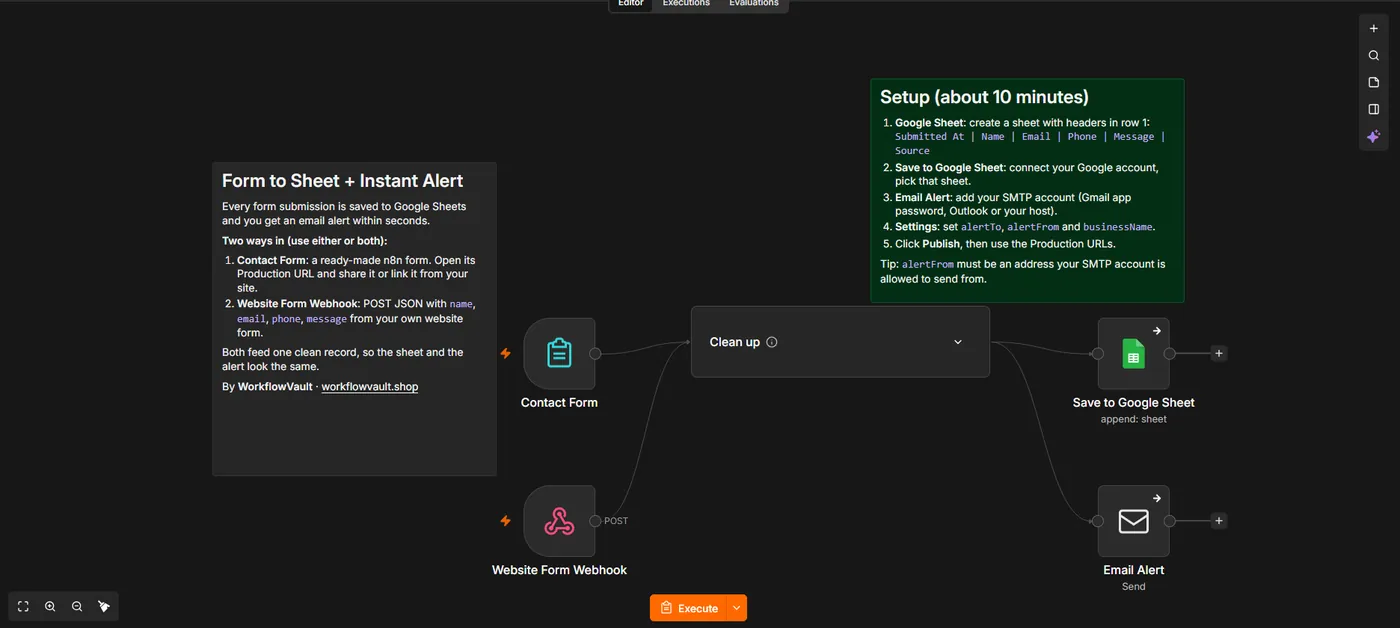
Two entry points feed one clean record, then Google Sheets and the email alert run side by side.

Read the full setup guide

Set up in about 10 min

  1. Get the fileDownload the .json workflow and setup guide.
  2. ImportIn n8n, open a new workflow and choose Import from File.
  3. ConnectAdd your own accounts where the sticky notes point.
  4. ActivateRun once to test, then publish. It keeps running on its own.

Questions

Can I connect my existing website form?

Yes. Point your form to the workflow's webhook URL.

Is WhatsApp required?

No. Email alerts work out of the box. WhatsApp is optional.

More from the vault

RC
Ops

AI Receipt & Invoice Logger

Reads receipts and invoices that arrive by email, pulls out vendor, date and amount with AI and logs them to Google Sheets.

Gmail→AI extract→Sheets
BK
Ops

Backup + Error Alerts

Backs up all your workflows to a private GitHub repo every night and emails you when any workflow fails.

Nightly→n8n API→GitHub→Email
UP
Ops

Website Uptime Monitor

Checks your websites every 5 minutes and emails you the moment one goes down, and again when it is back.

Schedule→Check URLs→Compare→Email