WorkflowVault

Sales & email · n8n template

AI Lead Responder: n8n workflow that replies to every new lead

Leads go cold when replies are slow. This workflow watches your inbox for new enquiries, saves each one to a Google Sheet and writes a personal reply draft in your voice, so answering a lead takes one click instead of ten minutes.
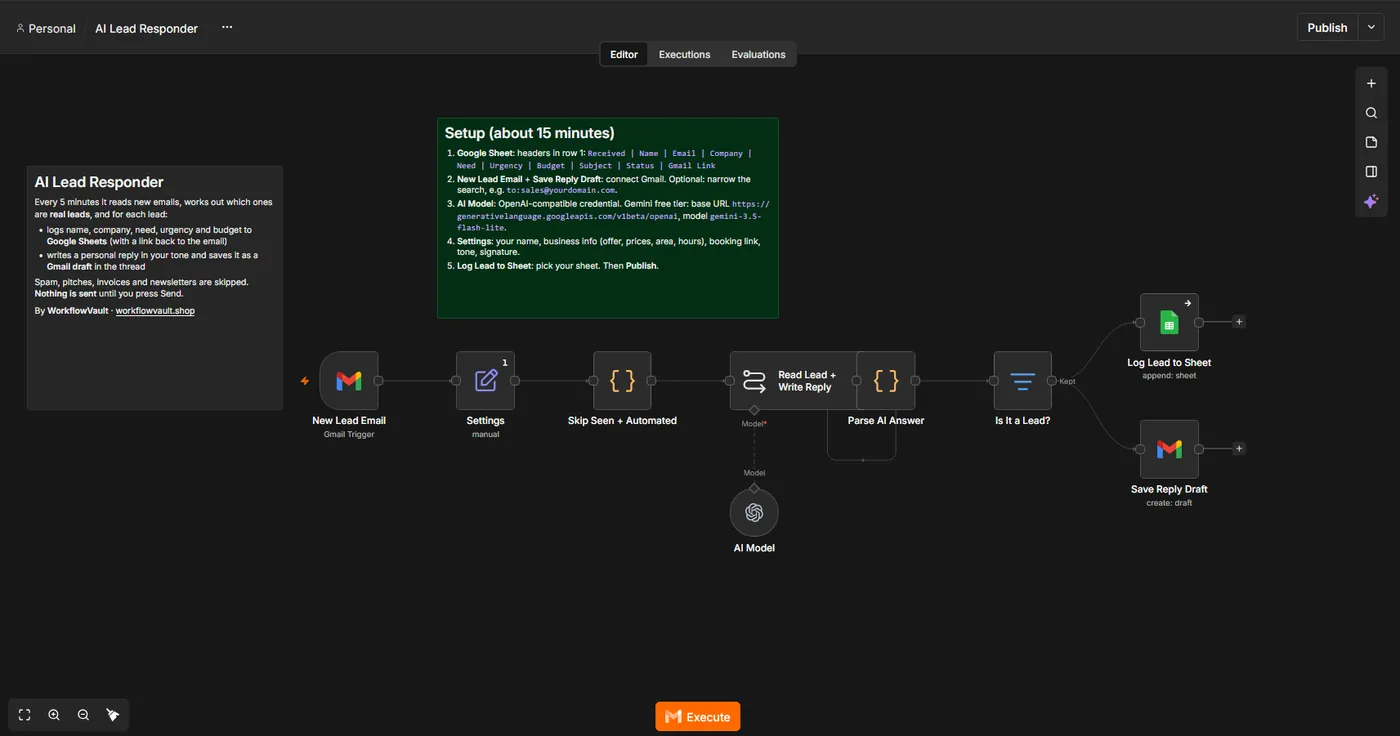
How the workflow runs

  1. Gmail triggerWatches a label or filter for new enquiry emails.
  2. AI AgentReads the email, pulls out name, need and urgency, and writes a reply using your offer and tone.
  3. Google SheetsAdds a row per lead: date, name, email, need, source and status.
  4. Gmail draftSaves the reply as a draft in the same thread. Nothing is sent without you.

What you get

  • Reply drafts waiting in Gmail for every new lead
  • All leads in one sheet with name, need and source
  • Your tone, offer and booking link set in one prompt
  • Sticky notes on the canvas explaining every node

What you need

  • n8n (Cloud or self-hosted)
  • Gmail account
  • Google Sheets
  • Any OpenAI-compatible AI key (Gemini free tier works)

See the workflow

Gmail trigger, settings, filtering, AI, then the sheet row and the Gmail draft side by side.

Read the full setup guide

Set up in about 15 min

  1. Get the fileDownload the .json workflow and setup guide.
  2. ImportIn n8n, open a new workflow and choose Import from File.
  3. ConnectAdd your own accounts where the sticky notes point.
  4. ActivateRun once to test, then publish. It keeps running on its own.

Questions

Will it send emails on its own?

No. It only creates drafts. You read, edit if needed and press send.

Can I use OpenAI or Claude instead of Gemini?

Yes. The AI step accepts any OpenAI-compatible endpoint, so you can switch models by changing the credential.

Does it work with Outlook?

The template ships for Gmail. Swapping the trigger and draft nodes for Outlook nodes is a small change, or ask for a Template install.

More from the vault

AR
Sales & email

Appointment Reminders

Emails your clients a reminder 24 hours and 2 hours before every booking in your Google Calendar.

Calendar→Due soon?→Email
GM
Sales & email

Gmail AI Reply Drafts

Creates a draft reply for incoming emails that match your filter, so your inbox has answers waiting.

Gmail→AI→Draft
FB
Sales & email

Customer Feedback AI Triage

Sorts every piece of customer feedback with AI, logs it to Google Sheets and alerts you instantly about unhappy customers.

Form→AI triage→Sheets→Alert
$19
DetailsComing soon