WorkflowVault

Ops · n8n template

Polite Invoice Chaser: n8n workflow that gets you paid without awkward emails

Late payments are the most awkward part of running a small business. This workflow sends the right reminder at the right time in the right tone, stops the moment the client replies, and never sends the final notice without you.
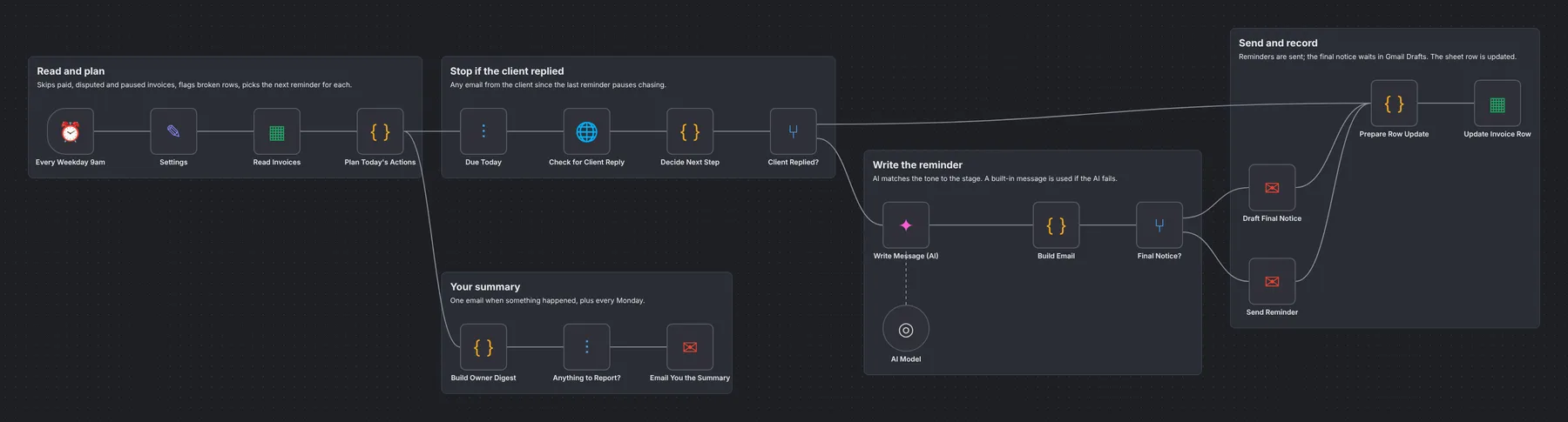
How the workflow runs

  1. Read and planEvery weekday it reads your invoice sheet, skips paid, disputed and paused invoices and flags broken rows.
  2. Check for a replyIf the client has emailed you since the last reminder, chasing pauses.
  3. AI writes the reminderFriendly before the due date, then polite, then firm. Amounts and dates are never changed; a built-in message is used if the AI fails.
  4. Send or draftReminders are sent from your Gmail; the final notice waits in Drafts for your OK.
  5. Record and reportThe row is updated and you get one summary: what needs you and who owes what.

What you get

  • Reminders that go out on time, every time
  • Escalating tone you control with one setting
  • Stops on Paid, Disputed, Paused or a client reply
  • Final notice drafted, never auto-sent
  • A summary of what is still unpaid

What you need

  • n8n (Cloud or self-hosted)
  • Gmail
  • Google Sheets
  • Any OpenAI-compatible AI key (Gemini free tier works)

See the workflow

Read and plan, stop if the client replied, write the reminder, send and record, and your summary.

Read the full setup guide

Set up in about 15 min

  1. Get the fileDownload the .json workflow and setup guide.
  2. ImportIn n8n, open a new workflow and choose Import from File.
  3. ConnectAdd your own accounts where the sticky notes point.
  4. ActivateRun once to test, then publish. It keeps running on its own.

Questions

Does it work with my accounting software?

It works from a Google Sheet, so export or copy your unpaid invoices into it. Ask us about a direct Xero, QuickBooks or Stripe version.

Can I change when reminders go out?

Yes. One setting controls the days, for example 3 days before, then 1, 7 and 14 days late.

Will it ever send something I didn't approve?

Reminders are automatic. The final notice is only ever saved as a draft for you to review.

More from the vault

RC
Ops

AI Receipt & Invoice Logger

Reads receipts and invoices that arrive by email, pulls out vendor, date and amount with AI and logs them to Google Sheets.

Gmail→AI extract→Sheets
FM
Ops

Form to Sheet + Alert

Saves every form submission to Google Sheets and alerts you by email or WhatsApp the moment it arrives.

Form→Clean up→Sheets→Email
BK
Ops

Backup + Error Alerts

Backs up all your workflows to a private GitHub repo every night and emails you when any workflow fails.

Nightly→n8n API→GitHub→Email