Setup guide · about 15 min
AI Local Lead Hunter: setup guide
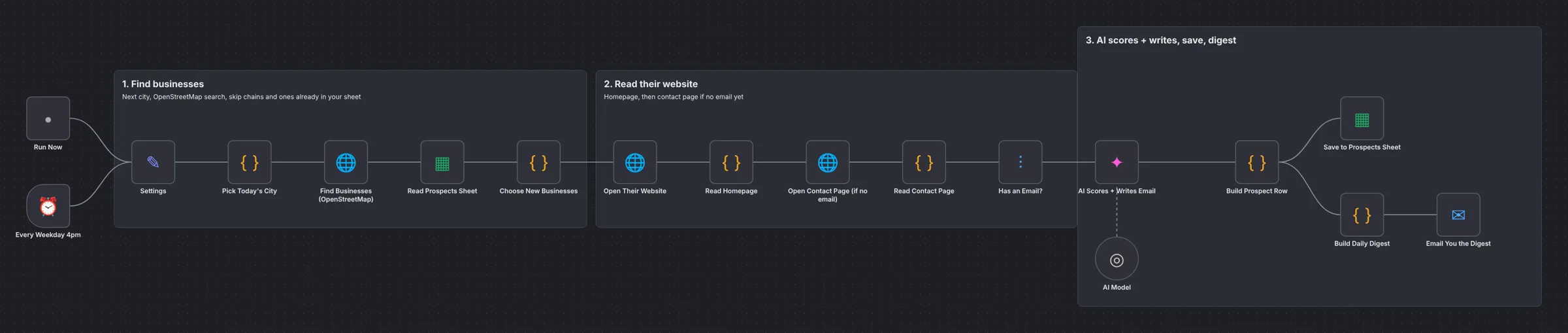
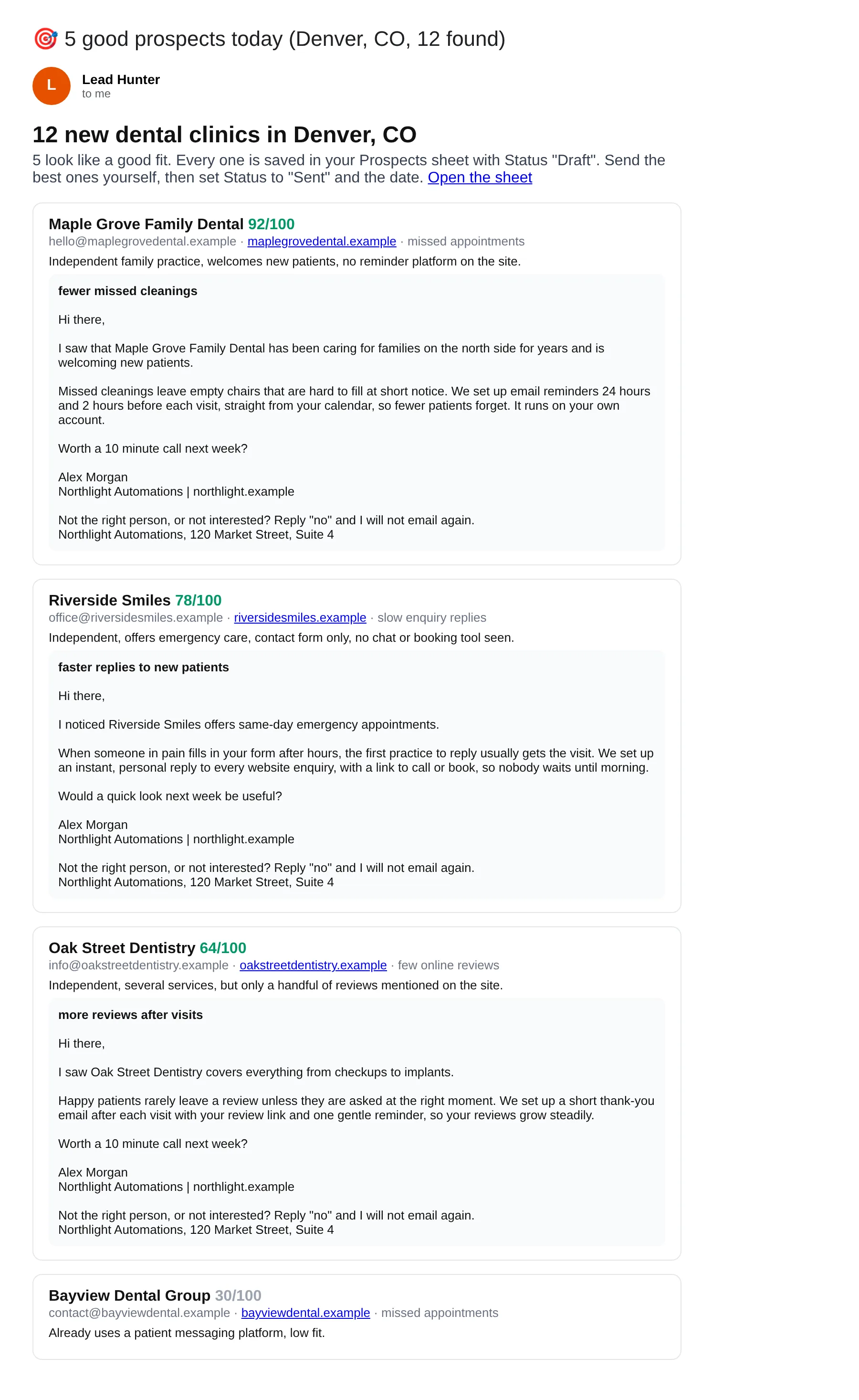
Every weekday the workflow takes the next city from your list and asks OpenStreetMap (free, no API key) for businesses in your niche that have a website. It skips chains, names you list and anyone already in your sheet, then opens each website (and the contact page if needed) to find a contact email and spot tools they already use. The AI scores the fit 0-100 and writes a short first email with one true detail about the business, your offer and an easy question. Every prospect is saved as Draft in your Prospects sheet and you get one digest email, best first. Nothing is sent to prospects.
How it works
STEP 01
Import the workflow
In n8n open Overview → Create Workflow, then the ⋯ menu (top right) → Import from File and pick the .json file. Sticky notes on the canvas repeat the key steps.
STEP 02
Create the Prospects sheet
A Google Sheet with a tab named Prospects. Headers are added on the first run: Added Business City Website Email Phone Address Score Angle Why Online Booking Tools Seen Subject Email Draft Status Sent On Follow-up On Notes OSM ID.
STEP 03
Connect Google Sheets, AI and email
A Google Sheets credential on Read Prospects Sheet and Save to Prospects Sheet (pick your sheet in both). An OpenAI credential in AI Model (Gemini free tier: base URL https://generativelanguage.googleapis.com/v1beta/openai, model gemini-3.5-flash-lite). An SMTP credential on Email You the Digest.
STEP 04
Choose your niche and cities
niche is the plain name (for example dental clinics). osmTags is how OpenStreetMap tags that kind of business, comma-separated: amenity=dentist,healthcare=dentist, shop=hairdresser,shop=beauty, leisure=fitness_centre, office=lawyer, amenity=restaurant, office=estate_agent, amenity=veterinary. cities is a list of names with a map box (south,west,north,east); a ready list is included. skipNames lists chains to ignore.
STEP 05
Describe your offer
offer: 2-3 plain sentences about what you do for these businesses. painPoints: the problems you solve, comma-separated; the AI picks the best one per prospect. platformsToSkip: tools that already do what you sell; businesses using them score low. Then senderName, company, website, postalAddress (added under every email, as cold email rules require), emailLanguage, digestTo and digestFrom.
STEP 06
Run once, then publish
Click Run Now. In 1-2 minutes the prospects appear in your sheet and the digest arrives. Read a few drafts, adjust offer or painPoints if needed, then Publish so it runs every weekday at 4pm. Send the best drafts from your own inbox and set Status to Sent.
What you'll see

Troubleshooting
Few or no businesses found
Check osmTags for your niche on the OpenStreetMap wiki (Map features) and try a bigger city. Only businesses with a website in OpenStreetMap are used.
Many found but few have an email
Normal: many small businesses only have a contact form. Raise leadsPerRun to 25 to get more with an email each day.
Every score is low
Check platformsToSkip: if a word there is common on websites (for example 'booking'), remove it. Make the offer clear and specific.
The same business appears twice
It is skipped when the same website domain is already in the sheet. Keep the Website column.
How much does it cost to run?
OpenStreetMap is free. With Gemini's free tier, 15 prospects a day stay within the free limits.
Need help?
Email hello@workflowvault.shop with a screenshot of the node and the error. Want it installed for you? Ask for a Template install.