Sales & email · n8n template
AI Local Lead Hunter: n8n workflow that finds prospects and writes the first email
Finding the right businesses to contact eats hours before you write a single email. Every weekday this workflow picks the next city, finds independent businesses in your niche, reads their websites, skips chains and anyone already in your sheet, scores how good a fit each one is and writes a short first email that mentions something real about them. Nothing is sent without you.
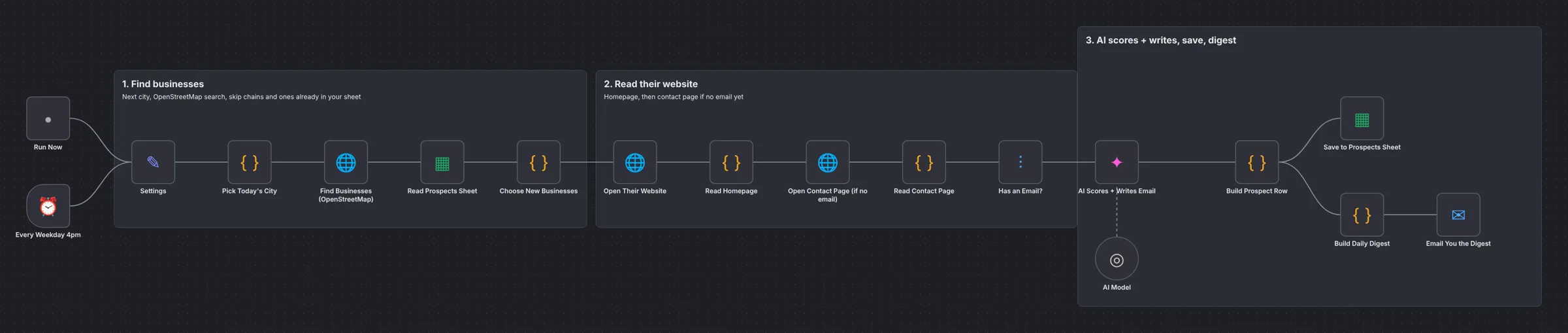
How the workflow runs
- Next cityRotates through your list of cities, one per run, with a ready list included.
- Find businessesSearches OpenStreetMap for your niche: dentists, salons, gyms, lawyers, restaurants and hundreds more. Free, no API key.
- Skip the wrong onesChains, brands, names you list and anyone already in your sheet are skipped.
- Read the websiteFinds a contact email on the homepage or contact page and spots tools they already use.
- AI scores + writesScores fit 0-100 and writes a 60-95 word email with one true detail about them, your offer and an easy question.
- Sheet + digestEvery prospect saved as Draft in Google Sheets; one email with the best ones first.
What you get
- 10-15 new researched prospects every weekday
- A real contact email from each business's own site
- Fit score and the reason, so you contact the best first
- A personal first email per prospect, with opt-out line and your address
- Chains and businesses already using a competitor skipped
- Works for any niche and any city, in any language
What you need
- n8n (Cloud or self-hosted)
- Google Sheets
- Any SMTP email account (for the digest)
- Any OpenAI-compatible AI key (Gemini free tier works)
See the workflow

Set up in about 15 min
- Get the fileDownload the .json workflow and setup guide.
- ImportIn n8n, open a new workflow and choose Import from File.
- ConnectAdd your own accounts where the sticky notes point.
- ActivateRun once to test, then publish. It keeps running on its own.
Related guides
Questions
Does it send emails to prospects?
No. Every draft is saved to your sheet and your digest. You review and send the ones you like from your own inbox, which keeps your sending reputation safe.
Where do the businesses come from?
OpenStreetMap, the free public map. No API key or paid data service, and only public business details are used.
Can I use it for a niche other than dentists?
Yes. Change niche and osmTags in Settings, for example shop=hairdresser, leisure=fitness_centre, office=lawyer or amenity=restaurant, and list your own pain points and platforms to skip.
Which cities?
Any city in the world. A ready list is included; add a city with its name and a map bounding box.
Is cold email allowed?
B2B cold email is allowed in many places if it is relevant, honest, has an opt-out and your postal address. The template adds both. Check the rules where you and your prospects are.
More from the vault