Getting paid · Guide
Contract Sign Follow-Up: Stop Waiting for Signatures
Quick answer
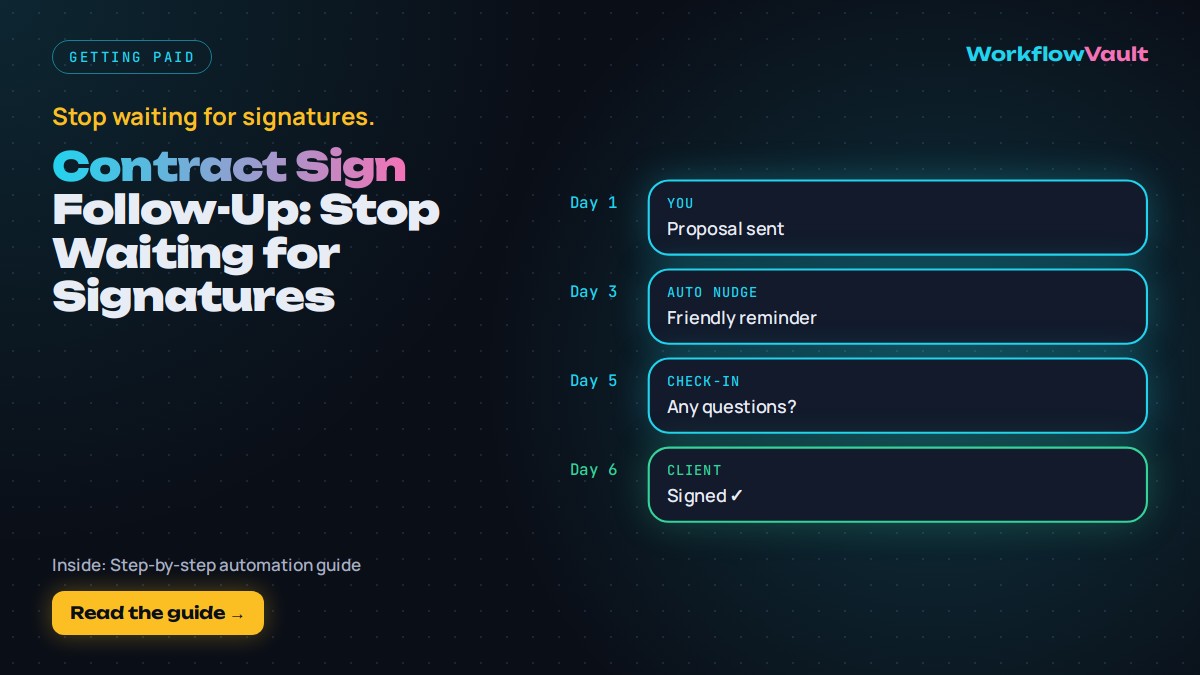
Automating contract sign reminders ensures your proposals and agreements get signed quickly without awkward manual follow-ups. By connecting your document tools to an automated notification system, clients receive polite gentle nudges on a schedule until the document is completed.
Sending a proposal or contract is only the first step in closing a new client. Once the document lands in their inbox, everyday distractions take over, and your agreement sits unread at the bottom of a busy pile.
Waiting days or weeks for a signature delays project start dates, ties up your schedule, and leaves you wondering whether to send another email or give them more space. Manual tracking gets messy quickly, especially when you are juggling multiple active client conversations at the same time.
The hidden cost of delayed client signatures
When signatures are delayed, your entire workflow pauses. You cannot schedule the work, order materials, or assign team members until the official paperwork is returned. This creates bottlenecks that make cash flow unpredictable and stress levels high.
Many business owners hesitate to chase signatures because they worry about sounding pushy or annoying the client. As a result, proposals sit unsigned for days while momentum fades. A systematic reminder process takes the emotion out of the delay and treats the signature simply as a routine next step.
Clients rarely delay out of malice. They simply forget, get buried in their own work, or misplace the link to the document. A polite, scheduled reminder acts as a helpful prompt that brings the task back to the top of their attention.
Why manual follow-up fails busy owners
Relying on memory to check whether a contract was signed is a losing battle. You might remember to check on Monday, forget on Tuesday, and send a rushed message on Friday that interrupts a different conversation.
Spreadsheets and sticky notes help for a little while, but they require manual updates every time a document goes out or comes back. If you miss a single update, you risk sending an awkward reminder to a client who actually signed the agreement yesterday.
Consistency is what drives action. Clients respond well to predictable, professional communication that guides them smoothly from agreement to project kickoff without making them feel interrogated.
Setting up a clear document tracking system
The foundation of any good follow-up system is a single place where all sent proposals and agreements are listed alongside their current status. Whether you use a simple spreadsheet or a dedicated dashboard, every row should show who received the contract, when it was sent, and whether it has been signed.
Keep the data entry minimal. Whenever you create a new proposal, log the client name, email address, and document link in your tracking sheet. This gives your automation system a clear reference point to check every day.
Organize your documents by date sent so you can easily spot which items have been pending the longest. Clear visibility stops proposals from falling through the cracks unnoticed.
Drafting gentle and effective reminder messages
The tone of your reminder messages makes all the difference. Keep your notes short, friendly, and focused on helping the client move forward with their project.
Your first reminder should simply check if they have any questions about the terms. Your second reminder can offer a quick call to review any sticking points together. Always include a direct link back to the document so they do not have to search their inbox.
- First nudge: Keep it light and helpful, offering answers to any questions.
- Second nudge: Provide a direct link to the agreement and mention your upcoming schedule availability.
- Final nudge: Ask if they would like to put the project on hold for now.
The workflow, step by step
- A trigger checks your document tracker every morning for pending agreements.
- The system checks the date the document was sent against your reminder schedule.
- If the time threshold is met, the workflow generates a personalized draft email.
- The message includes the correct client name and a direct link to the agreement.
- You receive a notification to review and send the reminder with one click.
- Once the document status updates to signed, all scheduled reminders stop automatically.
Comparing manual tracking with automation
| Approach | Time Required | Consistency | Risk of Errors |
|---|---|---|---|
| Manual sticky notes | High | Low | High |
| Spreadsheet reminders | Medium | Medium | Medium |
| Automated workflow | Low | High | Low |
Moving away from manual checks frees up hours of administrative time each month. You no longer have to scan your inbox trying to remember who owes you a signature.
Common mistakes to avoid when following up
Avoid sending too many reminders too quickly. Sending a message every single day creates friction and damages the professional relationship before the work even begins.
Make sure your automation immediately pauses the moment a signature is detected. Nothing frustrates a client more than receiving an automated nudge to sign a document they completed an hour ago.
Always verify that the document link in your email template points to the correct version for the specific client. Personalization builds trust and keeps communication clear.
Getting started with automated document reminders
Implementing a structured follow-up routine transforms how quickly your projects move from discussion to kickoff. You spend less time worrying about paperwork and more time delivering great work for your clients.
Explore our Polite Invoice Chaser template to see how automated reminders keep your administrative tasks running smoothly in the background.
Frequently asked questions
How often should I send contract reminders?
A gentle nudge every few days works well without overwhelming the client.
What if the client replies with questions?
The automated sequence should pause immediately so you can handle their questions personally.
Do I need complex software to track proposals?
A simple spreadsheet combined with your existing email tool is often more than enough.
How do I avoid sending reminders after the client signs?
Connect your document status so that any completed signature automatically stops active workflows.
Templates for this job
Want it built around your exact tools? Custom n8n workflows from $150.