Leads · Guide
Handle After Hours Enquiries Automatically
Quick answer
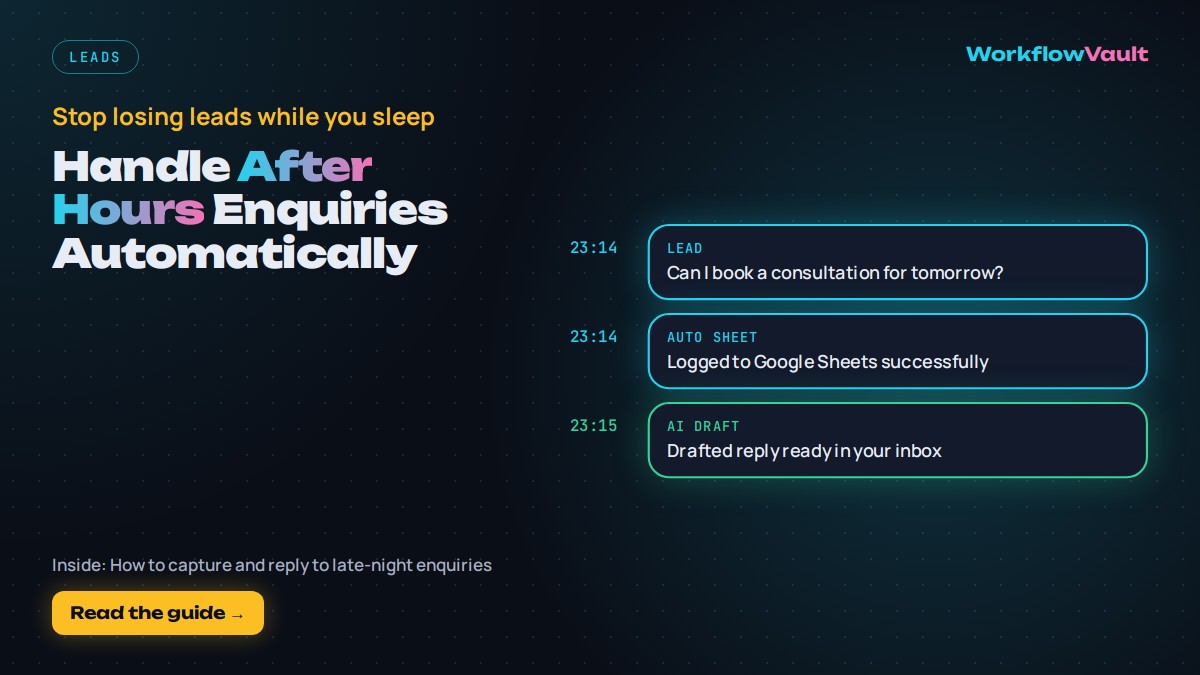
You can handle after hours enquiries by setting up an automated system that reads incoming missed call alerts or web forms, logs the details to Google Sheets, and sends a polite AI-drafted reply to the customer within minutes.
When a potential client calls your business or fills out your contact form late at night, they expect a quick answer. If your doors are closed and your phone goes to voicemail, that client often calls the next business on their search list.
Missing after-hours enquiries means losing revenue to competitors who reply faster. In this guide, we will look at practical ways to manage late-night messages, capture details before they slip away, and keep your evening free from manual admin.
Why After-Hours Enquiries Matter
Many customers search for services outside standard working hours. They might sit down to research a mechanic, a clinic, or a local agency after their own work day ends. When they land on your site or dial your number at eight o clock at night, they are ready to buy or book.
If they hit a dead end, their motivation drops. They might leave a voicemail that you only hear the next morning, by which time they have already spoken to someone else. Speed is everything in local service businesses, and capturing interest immediately sets you apart from slower competitors.
Speed also builds trust. A customer who receives an instant acknowledgment feels heard and valued, even if the actual work or consultation cannot happen until the next morning.
Capture Every Late-Night Form Submission
Your website contact form is your primary after-hours salesperson. When someone fills it out at midnight, that data needs to go somewhere safe right away. Relying on an inbox to hold it is risky because messages easily get buried.
Instead, connect your contact forms directly to a central spreadsheet so every detail is logged instantly. This gives you a clear record of who reached out, what they need, and when they submitted their request.
You can also use tools like save form submissions to google sheets to ensure you never miss a notification. Having all enquiries in one place makes morning review simple and organized.
Draft Personal Replies While You Sleep
Logging the enquiry is only the first step. The customer wants to know that someone got their message. Writing individual replies at night defeats the purpose of automation, but sending a generic, robotic auto-responder often feels cold.
Using artificial intelligence allows you to read the incoming message, understand what the customer needs, and draft a helpful, polite reply in your own brand tone. You can review and send this draft with one click first thing in the morning, or let it send safely if the rules allow.
For a complete setup that reads incoming lead emails, logs them, and prepares a draft, take a look at the AI Lead Responder template.
Set Clear Expectations on Your Website
Automation handles the back-end work, but your website copy should also manage customer expectations clearly. Let visitors know what happens when they contact you outside business hours.
A simple note near your contact form can work wonders:
- State your exact opening hours clearly so visitors know when you are live.
- Add a short sentence explaining that evening enquiries receive a detailed reply by the next morning.
- Encourage them to include specific details about their problem so you can help faster.
Compare Manual vs Automated Enquiry Handling
Managing after-hours leads manually versus using an automated workflow makes a massive difference in how many clients you retain.
| Approach | Response Time | Risk | Admin Effort |
|---|---|---|---|
| Manual Voicemail | Next morning | High drop-off | High |
| Basic Auto-Responder | Instant | Generic feel | Low |
| AI Workflow | Minutes | None | Minimal |
The Workflow, Step by Step
Building an automated after-hours response system is straightforward when you break it down into logical steps. Here is how the complete process works behind the scenes:
- A customer submits an enquiry form on your website late at night.
- A webhook captures the submission details immediately.
- The data is logged into your master Google Sheets lead tracker.
- An AI model reads the customer message and drafts a friendly response.
- The draft is saved in your email drafts or sent to you for a quick morning review.
Common Mistakes to Avoid
When setting up after-hours automation, keep these common pitfalls in mind to ensure a smooth experience for your leads.
Avoid sending overly long or confusing auto-replies. Keep the message short, friendly, and focused on the next step. Never promise an immediate call back at midnight unless you actually have staff on night shifts.
Make sure your lead capture forms always require an email address and phone number so you have multiple ways to follow up when business hours resume.
Conclusion
Handling after-hours enquiries does not require staying glued to your phone until midnight. By capturing details automatically, logging them neatly, and preparing thoughtful responses overnight, you protect your personal time while winning more business.
Frequently asked questions
What happens to enquiries sent at night?
They are captured instantly, logged to your spreadsheet, and an AI draft is prepared for your review in the morning.
Do I need technical skills to set this up?
No, pre-built automation templates handle the technical connections so you only need to plug in your accounts.
Will the replies sound robotic?
No, modern AI models can be prompted to match your specific brand voice and tone.
Can this also handle missed calls?
Yes, if your phone provider sends email alerts for missed calls, the system can parse those just like form submissions.
Templates for this job
Want it built around your exact tools? Custom n8n workflows from $150.