WorkflowVault

Sales & email · n8n template

AI Lead Qualifier + Follow-up: n8n workflow that scores, answers and follows up every lead

Most leads are lost to slow replies and forgotten follow-ups. This workflow answers every enquiry within a minute with a personal reply, scores it so you know who to call first, and quietly follows up until the lead replies, then hands the conversation back to you.
How the workflow runs

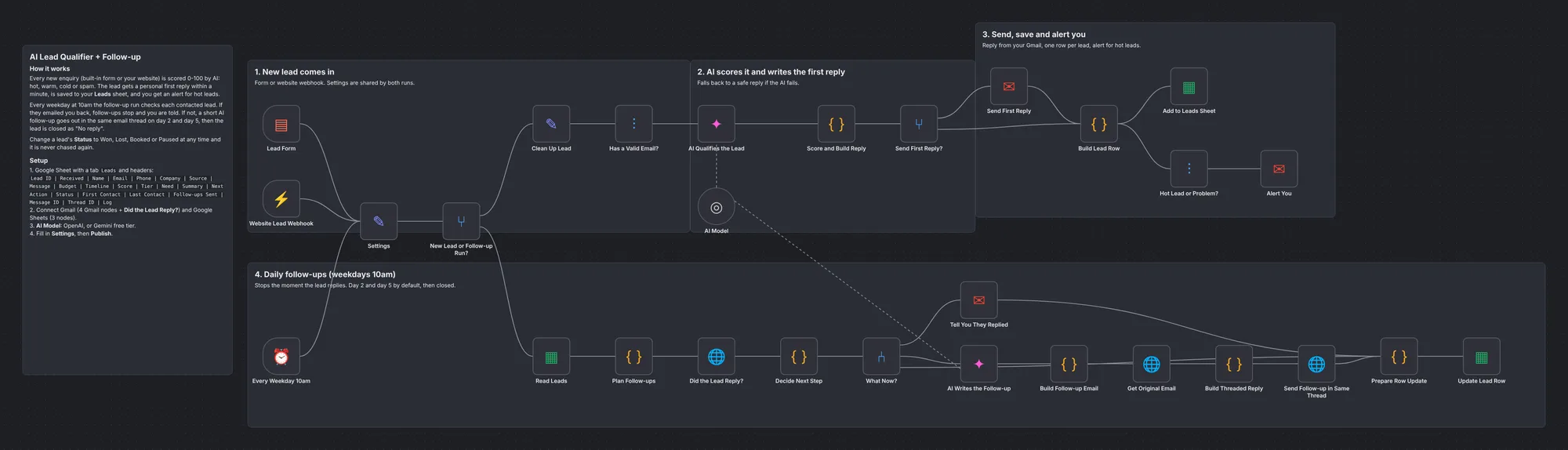
  1. Form or websiteBuilt-in n8n quote form, or POST from your own site to the webhook.
  2. AI qualifiesScores fit, need, budget and timing 0-100: hot, warm, cold or spam.
  3. First replyA personal reply from your Gmail within a minute, with an optional booking button.
  4. Leads sheet + alertEvery lead saved to a Google Sheets CRM; hot leads email you straight away.
  5. Daily follow-upsWeekdays at 10am: day 2 and day 5 follow-ups in the same thread, then closed as No reply.
  6. Stops on replyAny email from the lead stops the sequence and tells you.

What you get

  • A reply to every lead in about a minute
  • Lead score, need, summary and next action
  • Hot lead alerts with Reply-to set to the lead
  • Two polite AI follow-ups in the same email thread
  • Never chases anyone who has replied
  • Spam filtered out and logged, never answered

What you need

  • n8n (Cloud or self-hosted)
  • Gmail (Google account)
  • Google Sheets
  • Any OpenAI-compatible AI key (Gemini free tier works)

See the workflow

Two runs in one workflow: new leads at the top, the daily follow-up run below.

Read the full setup guide

Set up in about 20 min

  1. Get the fileDownload the .json workflow and setup guide.
  2. ImportIn n8n, open a new workflow and choose Import from File.
  3. ConnectAdd your own accounts where the sticky notes point.
  4. ActivateRun once to test, then publish. It keeps running on its own.

Related guides

Questions

Does it reply automatically?

Yes, the first reply and the follow-ups are sent from your Gmail so leads hear back fast. Set sendFirstReply to false if you only want scoring and alerts.

How do I stop chasing a lead?

Change its Status in the sheet to Won, Lost, Booked or Paused. Any email from the lead also stops it automatically.

Will follow-ups land in the same conversation?

Yes. Each follow-up is sent as a reply in the original Gmail thread, to the lead only.

Can I change the follow-up days?

Yes. followUpDays in Settings, for example 2, 5 or 3, 7, 14.

What if the AI is down?

The lead is still saved, gets a safe built-in reply and you are alerted to check it.

More from the vault

LD
Sales & email

AI Lead Responder

Reads every new lead email, logs it to Google Sheets and drafts a personal reply in your tone. You review and send.

Gmail→AI Agent→Sheets→Draft
AR
Sales & email

Appointment Reminders

Emails your clients a reminder 24 hours and 2 hours before every booking in your Google Calendar.

Calendar→Due soon?→Email
FB
Sales & email

Customer Feedback AI Triage

Sorts every piece of customer feedback with AI, logs it to Google Sheets and alerts you instantly about unhappy customers.

Form→AI triage→Sheets→Alert