Bookings · Guide
Shift Reminders for Small Business Staff
Quick answer
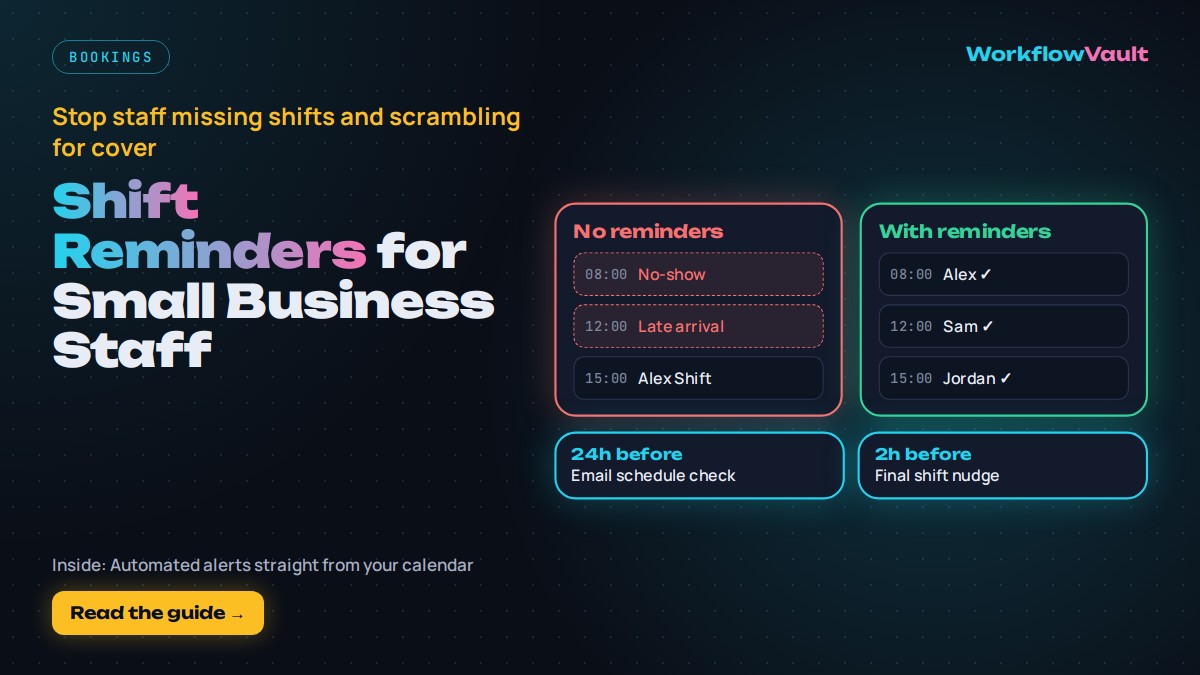
Automating staff shift reminders ensures your team never misses a shift. By connecting your scheduling calendar to automated alerts, your staff receive timely notifications via email or messaging apps before their shift starts, reducing no-shows and last-minute panic.
Running a small business means managing dozens of moving parts, and reliable staff attendance sits right at the top. When an employee forgets a shift or mixes up days, the entire operation stalls, customers wait, and present staff members bear the brunt of the stress. Manual group chats and frantic phone calls waste precious time that you could spend growing your business.
By setting up a reliable automated routine, you can take the burden of shift coordination off your plate entirely. Your schedule stays organized in a central place, and the system handles the heavy lifting of sending timely alerts. This guide covers how to set up clean shift reminders so your team stays on track without you needing to play dispatcher every single day.
The True Cost of Missed Staff Shifts
Every time a team member fails to show up on time, your business pays the price. Customers experience delays, service quality drops, and you end up scrambling to find cover at the last minute. Relying on team members to check a static paper schedule or scroll through endless group chat messages leaves too much room for human error. People get busy, miss notifications, and simply forget.
Creating a consistent communication rhythm solves this problem at the root. When your team receives clear, automated reminders ahead of their start times, accountability naturally improves. They have the details right in their inbox or messaging app, making it effortless to confirm attendance or flag a conflict early enough for you to find a replacement.
- Eliminates confusion about start times and location details.
- Reduces last-minute panic calls and emergency shift coverage.
- Builds a culture of punctuality and professional reliability.
- Frees up hours of owner admin time every single week.
Centralizing Your Roster in Google Calendar
The foundation of any good automation is a single source of truth. If your staff schedules live across sticky notes, scattered spreadsheets, and random text threads, automation cannot help you. Moving everything into a dedicated calendar system allows your workflow to read the data accurately and trigger reminders at the exact right moment.
Create a dedicated calendar specifically for staff shifts rather than mixing them with client bookings or personal appointments. Use clear naming conventions for every event, such as the staff member's name followed by their role and shift hours. This structure ensures that when your automation reads the calendar entry, it knows precisely who to notify and when the shift begins.
| Calendar Field | Example Value | Why It Matters |
|---|---|---|
| Event Title | Sarah - Morning Front Desk | Identifies who is working |
| Date & Time | Monday, 08:00 - 16:00 | Defines the exact schedule |
| Description | Open front doors and check mail | Provides specific shift tasks |
Drafting Clear and Friendly Shift Reminders
The tone of your reminders matters greatly. If the message sounds robotic or overly harsh, staff may ignore it or feel micromanaged. Instead, keep the language warm, professional, and direct. Make sure the essential details stand out immediately so your team can read the notification in seconds while on the move.
Here is a template you can copy and adapt for your own team notifications:
Subject: Friendly reminder: Your shift tomorrow at 08:00
Hi Sarah,
Just a quick note to remind you that you are scheduled for the Morning Front Desk shift tomorrow starting at 08:00.
Please let us know immediately if you encounter any unexpected issues.
See you tomorrow,
The Team
- Keep the subject line clear and informative.
- Include the exact start time and location.
- Provide a simple way to reply if an emergency arises.
The Workflow, Step by Step
Building an automated shift reminder system requires connecting your calendar tool to your notification channel using a flexible automation platform. Here is how the pieces fit together to run smoothly in the background:
- A schedule trigger checks your staff calendar every hour for upcoming shifts.
- The workflow filters events occurring within the next 24 hours.
- It extracts the staff member's email address and name from the event details.
- An AI or template node personalizes the reminder message with the correct shift times.
- The system sends the notification email or message directly to the staff member.
- A confirmation log records that the reminder was successfully dispatched.
For a complete ready-to-run setup that handles scheduling alerts effortlessly, you can explore the Appointment Reminders template as a starting point. If you want to dive deeper into managing business routines, check out our guide on 12 Small Business Tasks You Should Automate First (With Examples) for more practical ideas.
Common Mistakes to Avoid
Automating your communications can save tremendous amounts of time, but a few common pitfalls can trip up your setup if you are not careful. Testing your workflow thoroughly before unleashing it on your team prevents frustrating errors and ensures high reliability.
First, avoid setting reminder windows too close to the shift start time. If a reminder arrives only ten minutes before a shift, it offers zero time to find a replacement if someone is sick. Second, ensure your calendar event descriptions do not contain stray formatting that breaks the automation parser. Finally, always maintain a manual backup plan for days when internet connectivity or third-party APIs experience temporary downtime.
Conclusion
Managing staff attendance does not have to be a daily source of frustration and administrative drain. By centralizing your schedule and putting simple automated reminders in place, you protect your business operations and respect your team's time. Start small with a single calendar and one notification channel, and enjoy the peace of mind that comes with a reliable routine.
Frequently asked questions
How far in advance should shift reminders go out?
Sending a reminder 24 hours before the shift gives staff adequate notice to plan their travel and rest, while a secondary gentle nudge 2 hours before can catch last-minute oversights.
What if a staff member needs to call in sick?
Your automated reminder should instruct staff to reply directly to management or call the main office immediately upon receiving the notification if an emergency occurs.
Do I need coding skills to set this up?
No coding skills are required. Modern automation platforms use visual workflow builders where you connect pre-built nodes together using simple drag-and-drop actions.
Can I send reminders via SMS instead of email?
Yes, you can connect your scheduling trigger to popular messaging or SMS gateway nodes as long as you have your staff phone numbers stored securely in your system.
Templates for this job
Want it built around your exact tools? Custom n8n workflows from $150.