Customers · Guide
How to Onboard New Clients Smoothly Without Manual Admin
Quick answer
To onboard new clients smoothly, create a standard welcome sequence that automatically sends intake forms, logs details in your spreadsheet or CRM, and schedules your kickoff call without manual copying and pasting.
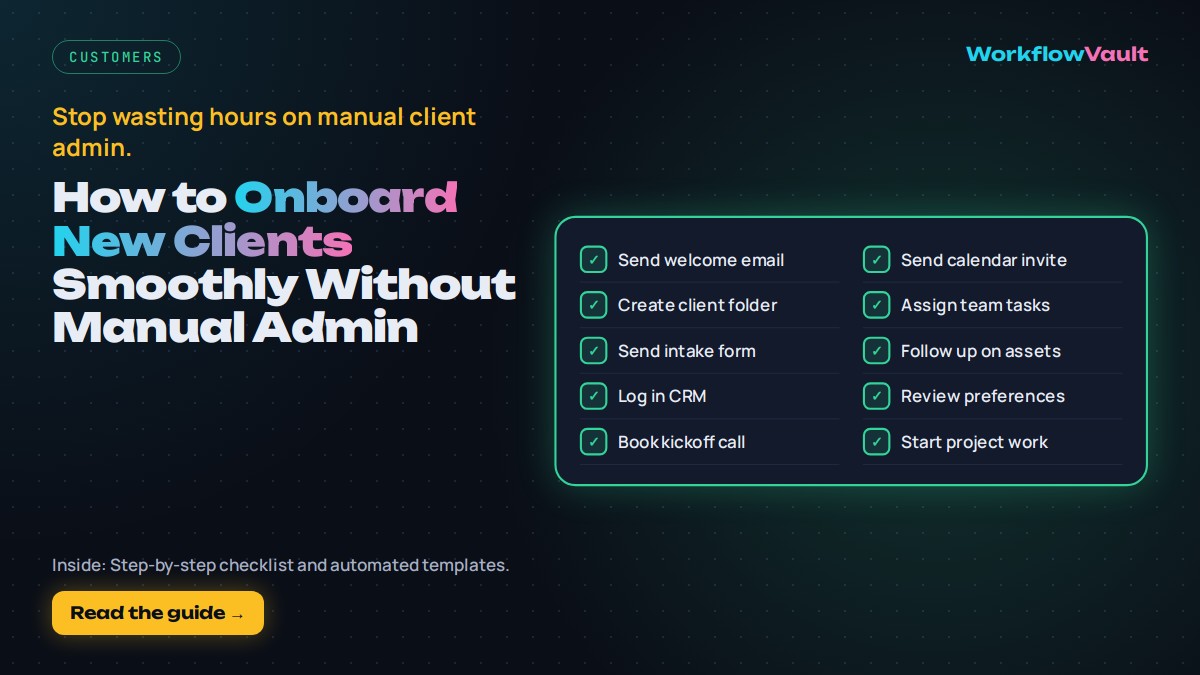
When a new client finally signs up or pays your deposit, the excitement is often followed by a wave of administrative chores. You need to send a welcome email, create a client folder, send an intake form, log their details in your CRM, and book an introductory call.
Doing all of this manually leaves plenty of room for delays, forgotten steps, and a disjointed experience for your brand new buyer. Setting up a reliable routine ensures every client gets the exact same warm welcome while you save hours of repetitive admin work every single week.
Map out every step of your client onboarding journey
Before you automate anything, write down every single action that happens between a client saying yes and your very first official working session. Look at what you currently send, what information you need to collect from them, and where those details live in your business.
Talk to your team or review past projects to see where bottlenecks usually happen. If you often forget to ask for brand assets, logos, passwords, or specific preferences until the last minute, make sure those requests are written down as mandatory tasks in your new sequence.
Keep the client's perspective in mind throughout this exercise. If you ask them to fill out three different forms and email documents to two different addresses, they will feel overwhelmed before the project even starts. Streamline the requirements so they can complete everything in one or two simple steps.
Create a standard welcome email template
Your welcome email sets the tone for the entire working relationship. It should arrive promptly after payment or contract signing, thanking them for their trust, confirming what happens next, and providing any immediate instructions they need.
Instead of writing this from scratch every time, draft a flexible template that includes placeholders for their name, project type, and key dates. A clear subject line such as your project checklist or welcome to our studio helps ensure it gets opened right away.
Include direct links to any intake questionnaires or scheduling tools inside this message. Make the instructions as clear as possible so the client knows exactly what to click and what to submit first.
Collect client intake details automatically
Collecting information through scattered email threads makes it very easy for important details to get lost. Use a structured online form for intake questions so all answers land neatly in one place without extra formatting on your end.
You can connect your form builder to a central spreadsheet so every new response instantly creates a clean row of data. This gives you a single reference point for each client's preferences, goals, and contact details without digging through your inbox.
Make sure your intake form only asks for information you actually need right now. Save deeper exploratory questions for your kickoff call so the form remains quick and easy for the client to complete on their first day.
Sync client data straight to your CRM or sheets
Manual data entry is one of the easiest ways to introduce typos and waste valuable time. When a new client completes your onboarding form, their contact details should travel automatically to your customer relationship management tool or master database.
This keeps your records up to date without requiring you to copy and paste names, email addresses, and project notes by hand. It also ensures that anyone on your team can see the current status of the client at a glance.
If you prefer keeping things simple, you can review google sheets crm small business for ideas on running a streamlined client database using spreadsheets you already use every day.
Schedule kickoff calls without the back and forth
Trading ten emails just to find a thirty-minute window for a kickoff call frustrates both you and your new client. Share a direct calendar booking link in your welcome email so they can pick a time that suits them instantly.
To reduce missed meetings, pair your calendar with automated reminders that go out ahead of time. You can read more about keeping schedules full in automatic appointment reminders google calendar for practical ways to cut down on no-shows.
Once the meeting is booked, make sure the calendar event automatically invites the client, generates a video link, and blocks out the time on your master team calendar so nobody double-books you.
Build a repeatable checklist for your team
Even if you are a solo operator, having a repeatable checklist helps you track what has been done and what still needs attention for each active client. If you work with assistants or subcontractors, a clear checklist ensures nothing falls through the cracks.
| Onboarding Step | Who Does It | Where It Goes |
|---|---|---|
| Welcome Email | Automated | Client Inbox |
| Intake Form | Client | Central Sheet |
| CRM Record | Automated | HubSpot or Sheets |
| Kickoff Booking | Client | Calendar |
Review your checklist every few months to see where clients tend to stall or ask questions. If three different people ask the same thing about your invoice or intake form, update your templates to clarify that point proactively.
The workflow, step by step
You can set up an automated onboarding sequence using an automation platform like n8n to handle the repetitive lifting for you. Here is how the pieces fit together:
- A trigger detects a new client signing up or completing your payment form.
- The system creates a new contact record in your database or CRM.
- A personalized welcome email with your intake form link goes out immediately.
- A task is created in your team board to prepare for the kickoff call.
- A reminder email is scheduled for the client twenty-four hours before the meeting.
Common mistakes to avoid during client onboarding
One common mistake is overloading the client with too many requests on day one. Give them one clear action item at a time so they feel supported rather than buried in paperwork.
Another pitfall is relying on memory instead of documented processes. If your onboarding steps live entirely inside your head, your service quality will fluctuate whenever you get busy or hire help.
Finally, avoid long periods of silence after the initial sale. Even if actual work on the project does not begin for a week, a simple check-in message reassures the client that they made the right choice.
To explore how automated tools can handle more of your repetitive communications, take a look at the AI Lead Responder template which helps draft personal replies as soon as new inquiries arrive.
Conclusion
Smooth client onboarding turns anxious new buyers into confident, loyal advocates for your business from day one. By replacing manual copy-pasting with reliable automated routines, you save hours of admin time and eliminate costly mistakes.
Start small by auditing your current welcome process today. Pick one bottleneck, such as sending welcome emails or logging form responses, and set up a simple template or automated workflow to handle it for you.
Frequently asked questions
How soon should I send my welcome email?
Your welcome email should go out immediately after the client signs up or pays, while their enthusiasm and excitement are at their peak.
What information should I collect in an intake form?
Only ask for essential details needed to begin the work, such as brand assets, primary goals, and key contact information, leaving deeper questions for your kickoff call.
How do I stop clients from missing kickoff calls?
Use online scheduling tools combined with automated email and text reminders sent twenty-four hours and two hours before the meeting.
Can I automate client onboarding without coding skills?
Yes, visual automation builders like n8n allow you to connect your forms, spreadsheets, and email tools using pre-built templates without writing code.
Templates for this job
Want it built around your exact tools? Custom n8n workflows from $150.